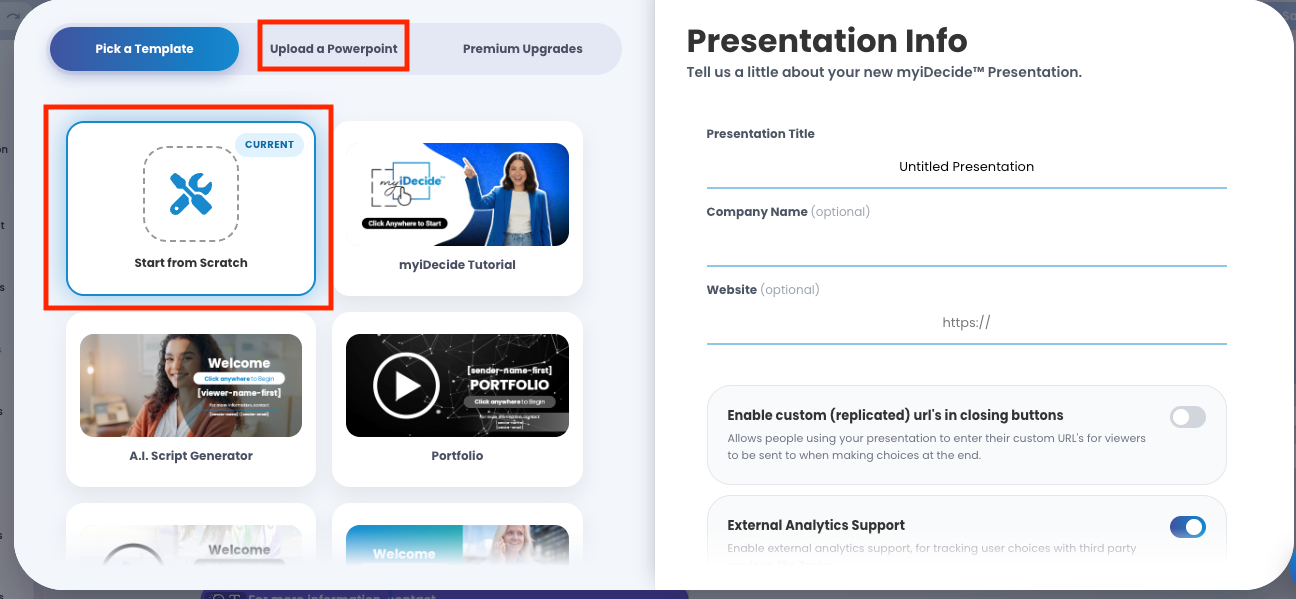
myiDecide gives you four ways to start a presentation: build from scratch, start from a template, upload a PowerPoint, or have our design team build it for you.
Start from Scratch #
A blank canvas. Best if you already know what you want and a blank screen does not intimidate you.
Pre-made Presentation Template #
Pick a template you like and customize it. The fastest route to something that looks finished, and the easiest way to learn where everything lives. Every detail is 100% editable.
Upload a PowerPoint #
Already have a deck? Upload it and the myiDecide Builder converts it into a myiDecide presentation. A success message appears when it is ready to edit. From there you can change anything and add the interactive pieces that make it an iDecide.
TIP: We recommend removing large videos for the initial PowerPoint upload, then upload them directly in myiDecide when it's done importing.
Premium Upgrades #
Don't want to build it yourself? Premium Upgrades is where you purchase iDecide Custom and our design team builds it for you on the myiDecide platform.

Coming back to a presentation #
Click the iDecide logo in the top left of the builder at any time, to get back to your presentations list.
Tip: If this is your first build, start from a template even if you plan to replace every slide. You will learn where everything lives far faster than you would staring at a blank canvas.