Open a presentation in the myiDecide Builder, open the AI iDecide Builder side panel, and answer a few questions about your business. It then builds the whole presentation in front of you. Plan on about 20 minutes.
Start a build #
- Sign in to myiDecide at my.idecide.com in Chrome.
- Open the presentation you want to build in the myiDecide Builder. Starting fresh? You can skip this and let the AI iDecide Builder make a new one.
- Click the AI iDecide Builder icon in your toolbar to open the side panel.
- When it asks about your presentation, choose I'm on the presentation or Make me a new one. The tab reloads once, which is normal.
- Answer the questions about your company, your audience, your offer, and what you want viewers to do next. Every answer has an Edit link if you change your mind.
- Answer the last question, or click Skip the rest & build at any point to start.
#
What happens during a build #
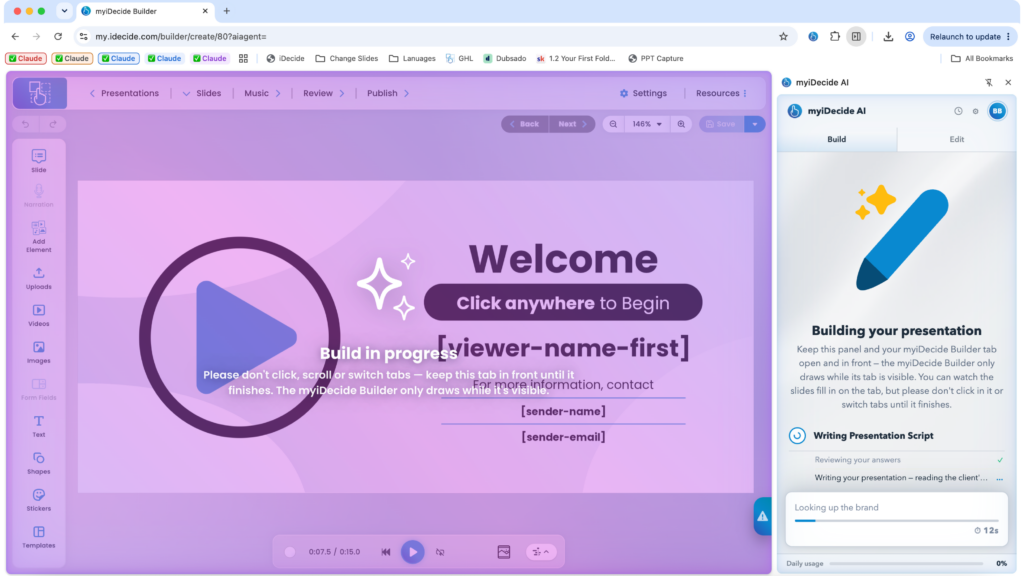
The panel works through five stages: Writing Presentation Script, Mapping Presentation, Creating Slide Graphics, Wiring Menus & Buttons, and Refreshing the myiDecide Builder. You can watch each slide as it is built.
While it works, the Builder tab is covered by a blue screen that says Build in progress. DO NOT LEAVE THIS TAB! The builder will stop working if you click to another tab.
Keep the build running #
- Don't click or scroll in the Builder.
- Don't switch tabs in that Chrome window or minimize Chrome.
- Don't let your computer go to sleep.
Need to do something else? Use a different Chrome window or another device.
If the panel closes #
Click the AI iDecide Builder icon to reopen it and choose Continue the build. Every finished slide is saved, so nothing is lost. You can also restart it from Using Build History.
When it's done #
You'll see Your presentation is ready! Click Reload the Builder & take a look to see it in the Builder. It is saved in your myiDecide account like any other presentation, so you review and publish it the usual way. See Reviewing and Publishing.
Tip: The more specific your answers, the better the first draft. Mention your real offer and the exact action you want viewers to take, like booking a call.