There are two main ways you might send presentations in different languages. What you see in your account depends on how your company asked us to set things up.
Multiple Presentations in the Dropdown Menu
Your company may have each language set up as its own presentation. In this case, you’ll see a separate option for each language in the Presentation dropdown when you create a link. Just choose the presentation in the language you want to send to your prospect, then create and send the link as usual.
One Presentation in Multiple Languages
Your company may also choose to have one presentation that’s available in several languages.
In this case:
Select the presentation from the Presentation dropdown.
A Language selector will appear.
Choose the language you want, or select “Auto-Detect Language.”
If you choose a specific language, the presentation will always display in that language.
If you choose Auto-Detect Language, our system will detect the viewer’s browser settings and play the presentation in their language. See below for more details.
What Does “Auto-Detect Language” mean?
If your company uses one presentation translated into multiple languages, you will see an “Auto-Detect Language” option in the language selector.
When Auto-Detect Language is selected:
Our system looks at the viewer’s browser language settings.
If the presentation is available in that language, it will display in that language.
If not, we’ll try the next best match based on their settings.
If we can’t find a close match, the presentation will default to English.
This helps ensure that each viewer sees the presentation in the language that’s most appropriate for them whenever possible.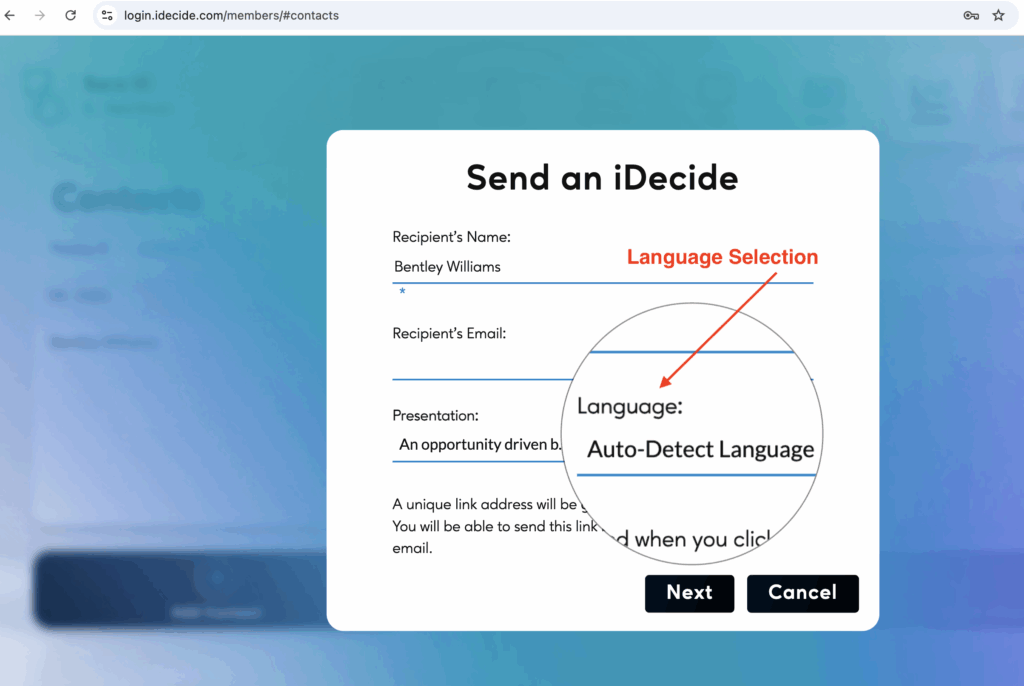
 Italiano
  English
  Français
  Deutsch
  Español de México
  ไทย
ไทย  简体中文
简体中文  繁體中文
繁體中文  香港中文
香港中文  Čeština
  Русский
  한국어
한국어  日本語
日本語  Türkçe
  Română
  Português
  Dansk
Dansk  Magyar
  Norsk bokmål
  Polski
  Svenska
  हिन्दी
  Tagalog